What are the options for providing the recipient's delivery address?
There are several ways to provide the recipient’s delivery address to make gifting even easier:
-
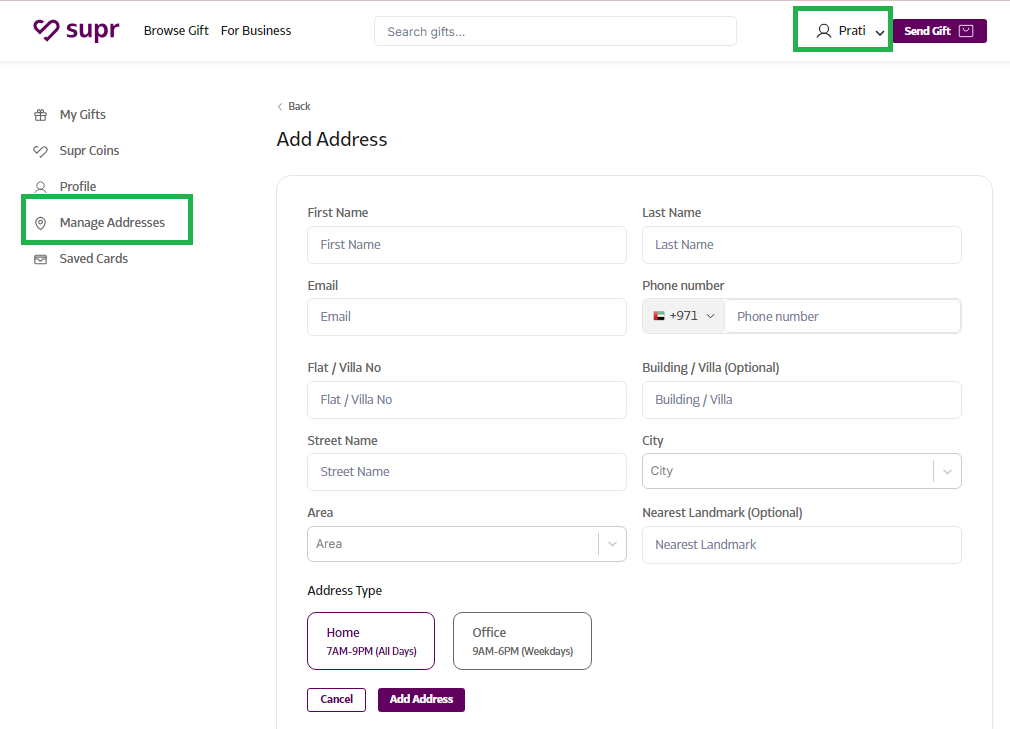
Save Frequent Addresses: If you often send gifts to the same people, you can save their addresses in your account for faster checkout. Just log in with your credentials and access saved addresses at any time.
-
Let the Recipient Provide Their Address: No need to worry if you don’t have the recipient’s address! When you send a gift via SMS or email, the recipient can enter their preferred shipping address when they accept the gift. They can also choose to swap the gift for something else they’d prefer.
-
Provide the Address at Checkout: If you’d rather provide the recipient’s address yourself, you can do so at checkout. However, in this case, the recipient won’t have the option to personally accept or exchange the gift.
How to Save Addresses
- Log in to your account using your credentials.
- Navigate to the "Manage Addresses" section.
- Enter the desired address, select the address type (Home or Office), and click "Add Address" to save it.
This will allow you to quickly access and reuse saved addresses for future gift deliveries, making the gifting process even more convenient!